The Elliott Wave Count MT4 Indicator is a powerful technical analysis tool designed to automatically calculate, identify, and label Elliott Wave structures on MetaTrader 4 charts, empowering traders to detect trends, spot key market reversals, and pinpoint high-probability buy and sell entry points.
Trading financial markets requires a structured understanding of price movement, trend dynamics, and underlying market cycles. Developed by Ralph Nelson Elliott in the 1930s, the Elliott Wave Theory remains one of the most respected analytical models in modern technical analysis. However, manually identifying wave counts on live price charts can be subjective, time-consuming, and prone to human error—especially for novice traders.
This is precisely why the Elliott Wave Count MT4 Indicator has become a staple for MetaTrader 4 users. By automating complex wave detection and plotting clear numeric counts directly onto your charts, this indicator simplifies price action analysis and helps you execute disciplined, high-reward trading strategies.
What is the Elliott Wave Count MT4 Indicator?
The Elliott Wave Count MT4 Indicator is a custom indicator for MetaTrader 4 that evaluates price swings and automatically identifies active Elliott Wave structures in real time.
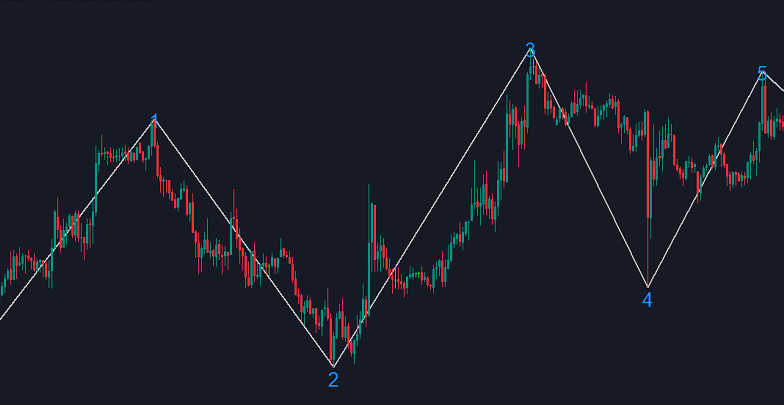
According to classic Elliott Wave principles, financial markets progress through repetitive cycles driven by trader psychology. These cycles consist of two primary phases:
1. Motive (Impulse) Phase: A 5-wave sequence moving in the direction of the dominant trend, labeled as 1, 2, 3, 4, and 5.
2. Corrective Phase: A 3-wave sequence moving against the main trend, labeled as A, B, and C (or multi-wave structures like A-B-C-D-E).
Instead of forcing traders to draw lines and debate wave degrees manually, the Elliott Wave Count MT4 Indicator uses advanced swing algorithms—derived from high/low pivot points—to identify wave peaks and troughs automatically.
Visualizing Bullish and Bearish Cycles
When loaded on a MetaTrader 4 chart, the indicator draws connecting trend lines across key price swings and places numerical markers at major turning points:
– Bullish Wave Setup: Displays higher highs and higher lows labeled 1 through 5, highlighting ideal long entry areas during Wave 2 or Wave 4 pullbacks.
– Bearish Wave Setup: Displays lower lows and lower highs labeled in a downward 5-wave structure, identifying optimal shorting opportunities.
Understanding Indicator Settings and Inputs
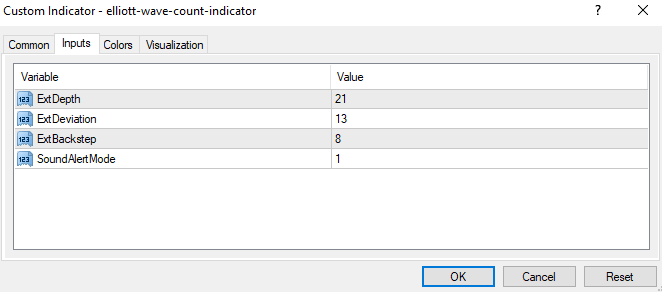 The Elliott Wave Count MT4 Indicator features straightforward inputs in its properties window, allowing traders to adapt it to various market environments:
– ExtDepth (Default: 21): Defines the look-back depth of price bars used to identify major swing points. Increasing this value filters out minor noise on higher timeframes.
– ExtDeviation (Default: 13): Sets the percentage price deviation needed to confirm a trend reversal and calculate a new wave pivot.
– ExtBackstep (Default: 8): Specifies the minimum number of price bars required between consecutive swing highs and swing lows.
– SoundAlertMode (Default: 1): Enables or disables sound alerts when the indicator establishes a new wave bar count.
Trading Strategies with the Elliott Wave Count MT4 Indicator
The Elliott Wave Count MT4 Indicator provides a clear framework for constructing high-win-rate forex trading strategies.
1. Trading Wave 3 (The Strongest Impulse Move)
Wave 3 offers the highest risk-to-reward ratio in Elliott Wave trading.
– Buy Setup:
1. Wait for the indicator to complete Wave 1 and Wave 2 in a bullish pattern.
2. Confirm that Wave 2 holds above the starting point of Wave 1.
3. Place a BUY order as Wave 2 completes its retracement.
4. Set your Stop Loss just below the swing low of Wave 1.
5. Set your Take Profit target near the completion of Wave 3.
– Sell Setup:
1. Identify a completed downward Wave 1 and upward Wave 2 retracement.
2. Place a SELL position near the peak of Wave 2.
3. Place your Stop Loss above the swing high of Wave 1.
4. Target the extension of Wave 3.
2. Combining Wave Counts with Fibonacci Tools
Pairing the Elliott Wave Count MT4 Indicator with Fibonacci Retracements significantly increases trade accuracy:
– Wave 2 usually retraces to the 50% or 61.8% Fibonacci level of Wave 1.
– Wave 4 typically pullbacks to the 38.2% or 50% Fibonacci level of Wave 3.
Multi-Timeframe Analysis and Limitations
Because market price action is fractal, Elliott Waves appear across all chart timeframes. Perform top-down analysis by using higher timeframes (H4 or Daily) to identify the macro wave direction, then switch to lower timeframes (M15 or H1) to refine entry execution.
– Repainting Potential: Like all swing-based indicators, wave labels may recalculate as new extreme prices form. Always wait for price action confirmation (such as candlestick reversal patterns) before placing trades.
– Ranging Markets: Elliott Wave patterns perform best in trending markets. Avoid trading on lower timeframes during tight sideways consolidation.