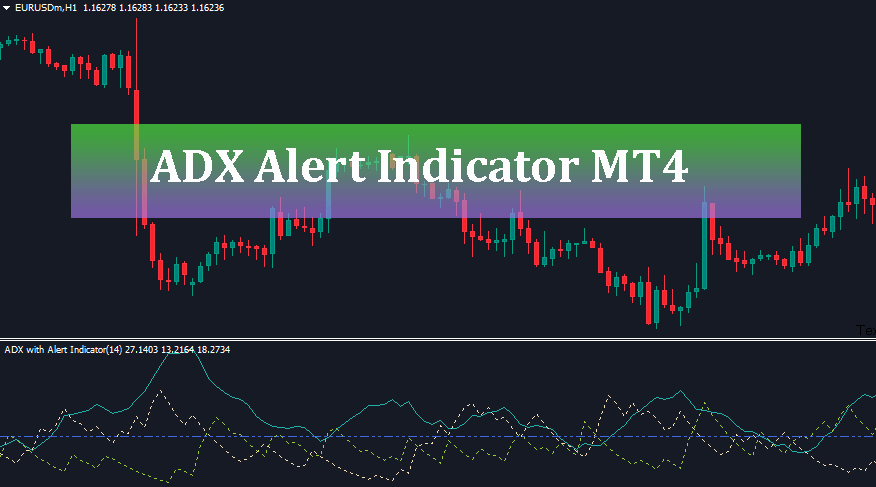
The ADX Alert Indicator MT4 is an enhanced technical analysis tool designed to measure market trend strength and direction, automatically sending real-time audio, pop-up, and email notifications whenever high-probability trading signals occur on MetaTrader 4 charts.
Identifying whether the market is trending strongly or consolidating in a sideways range is one of the most critical challenges for forex traders. While the standard Average Directional Index (ADX) developed by J. Welles Wilder is an exceptional indicator for measuring trend strength, traders often miss prime entry opportunities because the default tool lacks built-in alerts.
This is where the ADX Alert Indicator MT4 proves invaluable. By combining traditional directional movement analysis with customizable alerts, smoothing filters, and vertical signal lines, this custom indicator allows you to trade momentum efficiently without staring at price charts all day.
Related Post: ADX
What is the ADX Alert Indicator MT4?
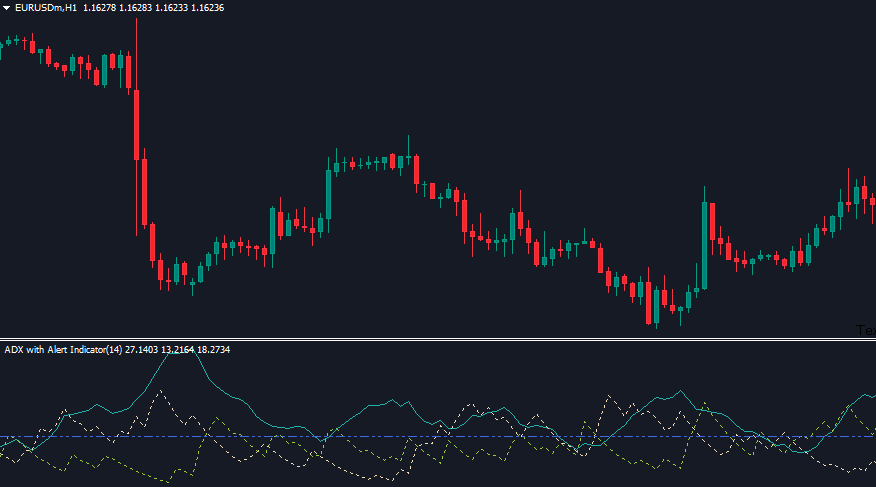
The ADX Alert Indicator MT4 is an upgraded version of the classical ADX oscillator for MetaTrader 4. It plots three primary components in a sub-window below the main price chart:
1. Main ADX Line: Measures the overall strength of the current trend (regardless of whether it is bullish or bearish).
2. Plus Directional Indicator (+DI): Measures bullish price movement momentum.
3. Minus Directional Indicator (-DI): Measures bearish price movement momentum.
Beyond standard calculations, this indicator monitors crucial crossovers (+DI/-DI) and key threshold breaks (such as the ADX line crossing level 20 or 25). When these technical conditions are met, the ADX Alert Indicator MT4 instantly notifies you via sound, screen pop-ups, or email alerts.
Key Features of the ADX Alert Indicator MT4
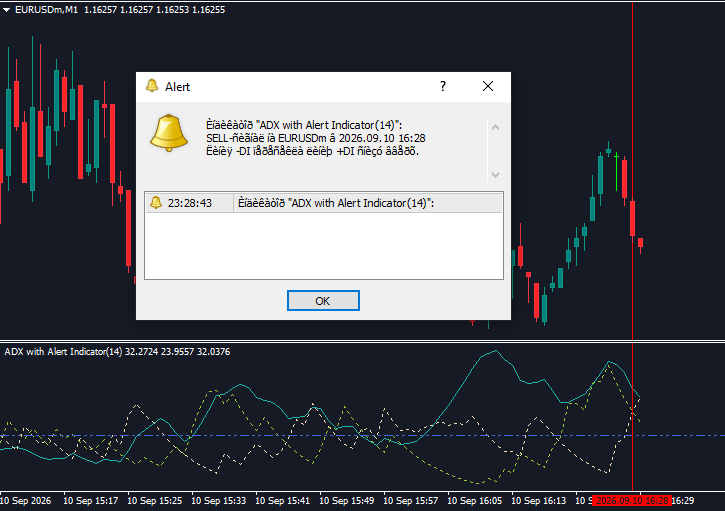
Why should you replace the standard MT4 ADX with the ADX Alert Indicator MT4? Here are its standout features:
– Custom Alert Triggers: Set independent alerts for directional crossovers (+DI and -DI crossing) or ADX level breaches.
– Optional Moving Average Smoothing: Includes UseSmooth_ADX and UseSmooth_DI options to smooth out market noise and reduce false signals.
– Visual Chart Signal Lines: Draws vertical lines on your main chart (ADX_DrawVertLine and DI_DrawVertLine) using custom colors for Buy and Sell signals.
– Close Bar Confirmation: Features the SignalOnlyAfterCloseBar setting to ensure alerts only trigger after a candle closes, preventing repainting issues.
– Fully Customizable Parameters: Adjust periods, calculation methods, applied price types, and alert sounds to match any trading strategy.
Understanding Indicator Inputs and Settings
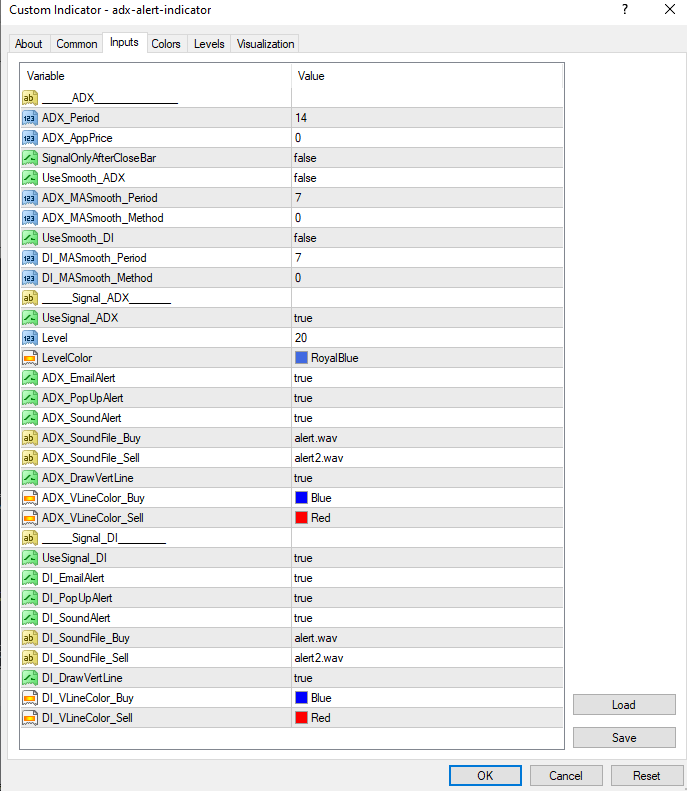
The ADX Alert Indicator MT4 provides a rich set of customizable inputs in its properties dialog box:
– ADX_Period (Default: 14): Specifies the look-back period for the ADX calculation.
– ADX_AppPrice (Default: 0): Defines the price source used (0 represents Close price).
– SignalOnlyAfterCloseBar (Default: false): When set to true, signals and alerts are generated only after the current candle closes to avoid false breakouts.
– UseSmooth_ADX / UseSmooth_DI (Default: false): Toggles Moving Average smoothing on or off for the ADX line and DI lines.
– ADX_MASmooth_Period / DI_MASmooth_Period (Default: 7): Controls the smoothing period if smoothing is enabled.
– UseSignal_ADX (Default: true): Enables or disables alerts based on the main ADX line crossing the specified threshold level.
– Level (Default: 20): The key ADX strength threshold. Readings above this level indicate a developing trend.
– ADX_EmailAlert / ADX_PopUpAlert / ADX_SoundAlert (Default: true): Toggles individual notification formats for ADX level signals.
– ADX_SoundFile_Buy / ADX_SoundFile_Sell: Specifies custom .wav sound files (e.g., alert.wav, alert2.wav) for Buy and Sell signals.
– ADX_DrawVertLine (Default: true): Enables drawing vertical colored lines across your main chart when signals occur.
– ADX_VLineColor_Buy / ADX_VLineColor_Sell: Defines the colors (e.g., Royal Blue, Red) for vertical signal lines.
– UseSignal_DI (Default: true): Toggles alerts triggered by crossovers between the +DI and -DI lines.
– DI_EmailAlert / DI_PopUpAlert / DI_SoundAlert / DI_DrawVertLine: Custom alert and line drawing controls specifically for +DI/-DI directional crossovers.
How to Read Signals and Trade with the Indicator
Interpreting the ADX Alert Indicator MT4 is straightforward once you understand how its components interact.
1. Gauging Trend Strength (Main ADX Line)
– ADX Below 20: Indicates a weak, ranging, or non-trending market. Traders should avoid trend-following strategies during this phase.
– ADX Crossing Above 20/25: Signals that a strong trend is emerging. This is often the catalyst for opening new momentum positions.
– ADX Above 40–50: Indicates an extremely powerful trend.
– ADX Turning Downward from Above 50: Suggests that the trend is losing momentum and may be heading into a consolidation or reversal phase.
2. Identifying Trend Direction (+DI and -DI)
– Bullish Signal (BUY): Occurs when the +DI line crosses above the -DI line while the main ADX line is rising above level 20.
– Bearish Signal (SELL): Occurs when the -DI line crosses above the +DI line while the main ADX line is rising above level 20.
Trading Strategies Using the ADX Alert Indicator MT4
Strategy 1: The +DI / -DI Crossover with Trend Filter
This core momentum strategy relies on combining directional movement with the strength filter:
– Buy Entry:
1. Wait for an alert confirming that the +DI line has crossed above the -DI line.
2. Verify that the main ADX line is above 20 and sloped upward.
3. Enter a BUY position at the open of the next candle.
4. Place a Stop Loss below the recent swing low.
5. Exit when -DI crosses back above +DI or when the ADX line turns down from extreme levels.
– Sell Entry:
1. Wait for an alert confirming that the -DI line has crossed above the +DI line.
2. Confirm that the main ADX line is above 20 and rising.
3. Enter a SELL position at the open of the next candle.
4. Place a Stop Loss above the recent swing high.
5. Exit when +DI crosses back above -DI.
Strategy 2: ADX Breakout Confirmation
Avoid false breakouts by using the ADX threshold alert as a filter:
– When price breaks key support or resistance, check the ADX Alert Indicator MT4.
– If the ADX line triggers a level 20 breach alert simultaneously, it confirms that strong market momentum supports the breakout, drastically improving trade execution quality.
Conclusion
The ADX Alert Indicator MT4 is a must-have upgrade for technical traders who want to harness the power of Welles Wilder’s Average Directional Index without constantly watching the screen. By automatically alerting you to directional crossovers and trend strength surges, it simplifies trend-following strategies, reduces fatigue, and ensures you never miss a profitable momentum trade on MetaTrader 4.