Supply and Demand Zones Indicator MT4 automatically identifies and draws institutional supply and demand zones directly on your MetaTrader 4 charts, highlighting prime market imbalance areas for high-probability trade execution.
Understanding Supply and Demand in Forex Trading
At its core, financial market price movement is driven by the fundamental relationship between supply and demand. When buyers overwhelm sellers, demand exceeds supply, causing prices to rise. Conversely, when sellers flood the market, supply exceeds demand, driving prices down.
Institutional market participants—such as central banks, hedge funds, and major commercial institutions—do not place trades like retail traders. Because of their immense order volumes, they cannot enter positions all at once without causing drastic price slippage. Instead, they accumulate or distribute massive positions at specific price levels. These institutional footprints create Supply and Demand Zones:
* Supply Zone: A price area above current price action where institutional sell orders are concentrated. As price rises into this area, supply overwhelms demand, initiating a downward reversal or trend continuatio
* Demand Zone: A price area below current price action where institutional buy orders are concentrated. As price drops into this area, demand overwhelms supply, launching an upward reversal or rally.
While identifying these zones manually requires extensive practice and market structure analysis, the Supply and Demand Zones Indicator MT4 automates this process by dynamically calculating price imbalance origin points across any asset or timeframe.
What is the Supply and Demand Zones Indicator MT4?
The Supply and Demand Zones Indicator MT4 is a price action trading tool custom-built for the MetaTrader 4 platform. It scans historical price data for explosive price moves (imbalances) and projects highlighted horizontal bands forward onto the active chart.
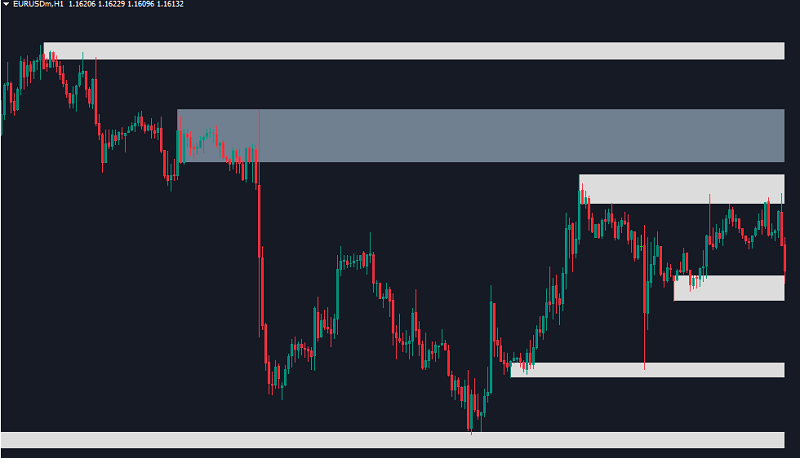
Unlike static support and resistance lines, this indicator focuses on multi-layer price zones that reflect real institutional interest. By categorizing zones based on their historical freshness and strength, it allows traders to distinguish between fresh, untouched setup areas and tested, weakened levels.
Key Visual Elements:
1. Strong Zones (SlateGray Rectangles): Represent untouched, high-probability supply or demand areas where price aggressively departed in the past, leaving significant unfilled institutional orders behind.
2. Weak / Retouched Zones (Gainsboro / Light Grey Rectangles): Indicate zones that price has already retested or partially mitigated. As price repeatedly touches a zone, its liquidity decreases, making it less reliable for future trade setups.
How the Indicator Works
The indicator continually scans candle-by-candle structure to identify consolidation bases that precede rapid price expansions. When price moves away rapidly from a consolidation range, the indicator marks that origin range as a valid supply or demand block and projects it forward into future price action.
Key Features:
* Automated Zone Calculation: Completely removes subjective charting errors by calculating zone highs, lows, and boundaries algorithmically.
* Multi-Timeframe Functionality: Configurable to display zones from higher timeframes (such as H4 or Daily) directly on lower execution timeframes (such as M5 or M15).
Trading Strategies with Supply and Demand Zones Indicator MT4
Trading supply and demand zones is most effective when paired with sound risk management and market structure confirmation. Below are two primary trading methods using the Supply and Demand Zones Indicator MT4:
1. Zone Retest Strategy (Trend Continuation)
This strategy aims to catch trend continuation moves when price retraces into a fresh institutional zone aligned with the dominant trend.
* Buy Setup:
1. Determine that the higher timeframe structure is in an uptrend.
2. Locate a fresh Strong Demand Zone (Darker SlateGray band below price).
3. Wait for price to pull back and touch the top boundary of the demand zone.
4. Look for price action confirmation (such as a bullish pin bar, engulfing candle, or lower-timeframe market structure shift).
5. Enter a BUY position.
6. Place Stop Loss slightly below the bottom edge of the demand zone.
7. Set Take Profit at the nearest Supply Zone or a minimum 1:2 Risk-to-Reward ratio.
* Sell Setup:
1. Confirm an established overall downtrend.
2. Identify a fresh Strong Supply Zone (Darker SlateGray band above price).
3. Wait for price to rally into the supply zone.
4. Seek bearish price action confirmation inside the zone.
5. Enter a SELL position.
6. Place Stop Loss slightly above the upper boundary of the supply zone.
7. Set Take Profit at the nearest Demand Zone or logical support structure.
2. Zone Breakout & Role Reversal Strategy
When price breaks decisively through a strong supply or demand zone, the market structure shifts, causing a role reversal.
* Supply-to-Demand Shift: When a strong Supply Zone is breached to the upside with strong momentum, it indicates buyers have absorbed all institutional selling interest. Upon a retest from above, this broken supply area often converts into a new Demand Zone for a BUY trade.
* Demand-to-Supply Shift: When a Demand Zone is broken downward, sellers have completely overwhelmed buyers. A subsequent pull-back to retest the broken zone from below offers a high-probability SELL opportunity.
Input Settings and Customization
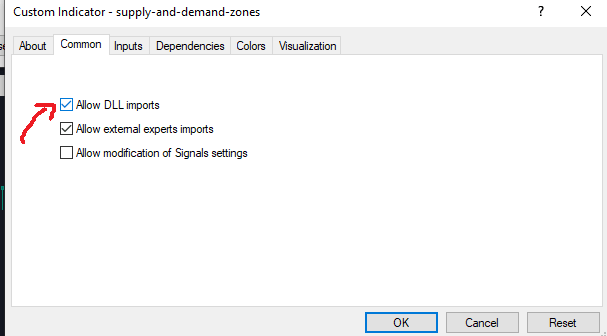
Check DLL box:
The Supply and Demand Zones Indicator MT4 offers an extensive list of customizable settings in its Inputs tab, allowing traders to adapt its visual appearance and functionality to their personal trading style.
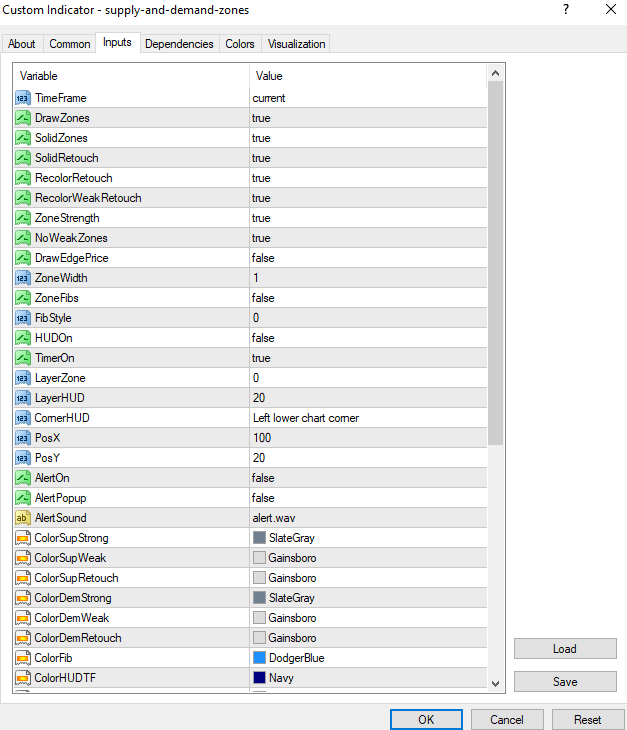
* TimeFrame: Sets the timeframe used for zone calculation (current or specific higher timeframes like H1, H4, D1).
* DrawZones (true/false): Master toggle to enable or disable zone drawing on the chart.
* SolidZones (true/false): Controls whether drawn zones appear as filled solid rectangles or outline boxes.
* SolidRetouch / RecolorRetouch (true/false): Enables recoloring or visual adjustment of zones once they have been retouched by price.
* ZoneStrength (true/false): Toggles algorithmic calculation of zone strength levels.
* NoWeakZones (true/false): When set to true, filters out weak or heavily tested zones, keeping your charts clean and focused only on high-probability levels.
* DrawEdgePrice (true/false): Option to display exact price labels along the upper and lower edges of the zones.
* ZoneFibs / FibStyle: Enables optional Fibonacci level overlays within drawn zones for refined entry placement.
…
Conclusion
The Supply and Demand Zones Indicator MT4 is a versatile price action tool that translates complex institutional order flow into clear, actionable chart visuals. By automating the identification of fresh supply and demand imbalances and offering robust customization options, it enables MetaTrader 4 traders to execute high-probability strategies with disciplined risk management.
One Reply to “Supply and Demand Zones Indicator MT4”