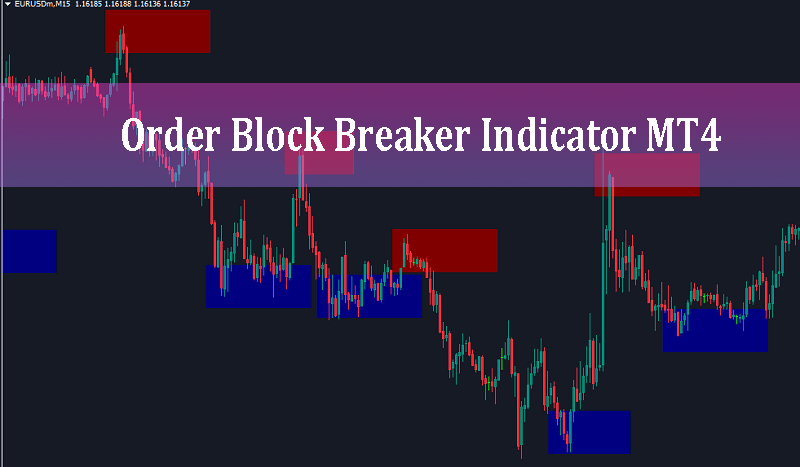
Order Block Breaker Indicator MT4 provides essential information on market structure by identifying major trend reversals, momentum exhaustion points, and key institutional supply and demand zones directly on MetaTrader 4 charts.
In modern Forex trading, Smart Money Concepts (SMC) and institutional order flow analysis have revolutionized how traders view market structure. Rather than relying on traditional retail technical tools like static horizontal lines or lagging oscillators, institutional traders focus on Order Blocks—price areas where large banks, hedge funds, and financial institutions accumulate or distribute massive trading volumes.
An order block represents a specific market structure:
* Bullish Order Block: The last bearish candle prior to a strong, aggressive bullish price move.
* Bearish Order Block: The last bullish candle prior to an intense downward price movement.
When institutions place substantial orders, they leave footprints behind. Price frequently returns to retest these order blocks before continuing in the original directional impulse. However, manually identifying these institutional blocks across multiple currency pairs and timeframes can be time-consuming and prone to subjective interpretation.
This is where the Order Block Breaker Indicator MT4 excels. It automates the detection process, continuously monitoring price action to paint precise institutional zones directly onto your terminal.
What is the Order Block Breaker Indicator MT4?
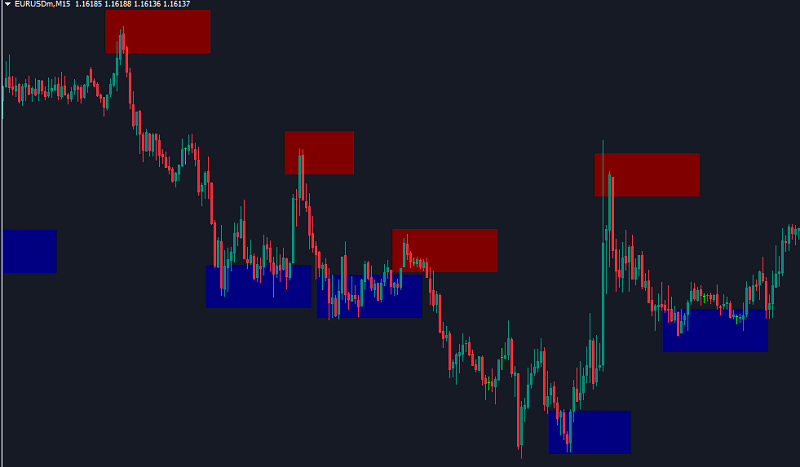
The Order Block Breaker Indicator MT4 is a price action and market structure tool designed for MetaTrader 4. It scans historical price action for momentum shifts and draws clean, colored rectangular blocks on your chart to visually represent high-probability support and resistance areas.
Unlike basic level indicators, this custom MT4 tool highlights both active order blocks and breaker zones—order blocks that have been breached or invalidated by strong momentum. A broken order block often leads to a role reversal where previous support turns into resistance (or vice versa), offering counter-trend or trend-continuation retest opportunities.
Key Visual Features on the MT4 Chart
1. Bullish Order Blocks (Navy Blue Rectangles): Represent institutional demand zones where buyers previously overwhelmed sellers. Price approaching or re-entering these blue zones signals potential bullish reversals or buy setups.
2. Bearish Order Blocks (Maroon / Dark Red Rectangles): Represent institutional supply zones where heavy sell volume entered the market. Price reaching these dark red zones signals potential bearish reversals or sell setups.
3. Breaker Blocks: Highlighting areas where market structure shifted, indicating momentum transition and high-probability retest areas.
How the Order Block Breaker Indicator Works
The indicator constantly monitors candlestick formations and price expansion. When it identifies a consolidation pattern followed by an explosive move, it isolates the origin candle (the order block) and projects a horizontal rectangle forward.
Core Functionality:
* Automatic Detection: Eliminates guesswork by instantly calculating order block boundaries based on volume expansion and market swings.
* Exhaustion & Reversal Spotting: Detects price exhaustion points where counter-trend moves are likely to occur.
* Multi-Timeframe Suitability: Works efficiently across all MetaTrader 4 timeframes, including M5, M15, M30, H1, H4, and Daily charts.
* Real-time Alert System: Sends instant notifications (pop-ups, audio alerts, and mobile push notifications) when price touches or interacts with key zones.
Trading Strategies with Order Block Breaker Indicator MT4
To trade successfully with the Order Block Breaker Indicator MT4, traders should view these blocks as dynamic zones rather than single lines. Here are two high-probability strategies to incorporate into your trading plan:
1. The Order Block Rejection Strategy (Trend Continuation)
Order blocks that align with the prevailing market trend yield the highest risk-to-reward ratios.
* BUY Setup:
1. Confirm the overall market structure is bullish on a higher timeframe (e.g., H1 or H4).
2. Wait for price to pull back into a Navy Blue Bullish Order Block on your active timeframe.
3. Look for price action confirmation inside the zone (such as a bullish pin bar, engulfing pattern, or lower-timeframe market structure break).
4. Enter a BUY position.
5. Place your Stop Loss slightly below the bottom edge of the bullish block or previous swing low.
6. Target the next opposing supply zone or a minimum Risk-to-Reward ratio of 1:2 or 1:3.
* SELL Setup:
1. Confirm the overall market structure is bearish.
2. Wait for price to rally up into a Maroon Bearish Order Block.
3. Look for bearish price action rejection inside the supply block.
4. Enter a SELL position.
5. Set your Stop Loss just above the upper boundary of the bearish block or recent swing high.
6. Set Take Profit at the nearest demand level or support zone.
2. The Breaker Block Reversal Strategy (Structure Shift)
When price aggressively penetrates an established order block instead of respecting it, a market structure transition occurs.
* If a Bearish Order Block (Maroon) is broken to the upside by strong buying momentum, it converts into a Bullish Breaker. When price retraces back down to test this newly broken zone from above, it often acts as strong support for a BUY entry.
* Conversely, if a Bullish Order Block (Navy Blue) is broken downward by aggressive sellers, it becomes a Bearish Breaker. A pull-back to test the block from below provides a high-probability SELL entry opportunity.
Input Parameters and Customization Options
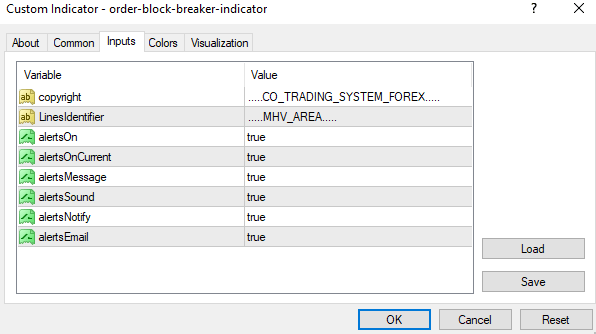
* alertsOn (true/false): Master switch to enable or disable overall alert capabilities.
* alertsOnCurrent (true/false): When set to true, triggers alerts on the current live candle as soon as price touches an order block.
* alertsMessage (true/false): Enables pop-up message boxes inside MetaTrader 4 when a signal forms.
* alertsSound (true/false): Plays an audio alert sound upon signal generation.
* alertsNotify (true/false): Sends push notifications directly to the MT4 mobile application on your iOS or Android device.
* alertsEmail (true/false): Sends an email notification whenever an order block interaction occurs.
Conclusion
The Order Block Breaker Indicator MT4 is an indispensable addition to any price action or Smart Money trader’s toolkit. By accurately identifying institutional supply and demand zones, as well as critical breaker points, it helps traders execute high-probability trades with precise risk management.